Post
Repo Deep Dive: n8n-io/n8n
1. 이 repo가 중요한 이유
n8n-io/n8n는 GitHub star 194,540개를 가진 대규모 오픈소스 프로젝트다. 많은 개발자가 선택한 프로젝트이므로 README, 구조, 설정 파일만 봐도 제품화와 운영 성숙도에 대한 단서를 얻을 수 있다.
2. 한 문장 요약
Fair-code workflow automation platform with native AI capabilities. Combine visual building with custom code, self-host or cloud, 400+ integrations.
3. 제품/문제 정의
GitHub description: Fair-code workflow automation platform with native AI capabilities. Combine visual building with custom code, self-host or cloud, 400+ integrations.
README 초기 신호:

-
n8n - Secure Workflow Automation for Technical Teams
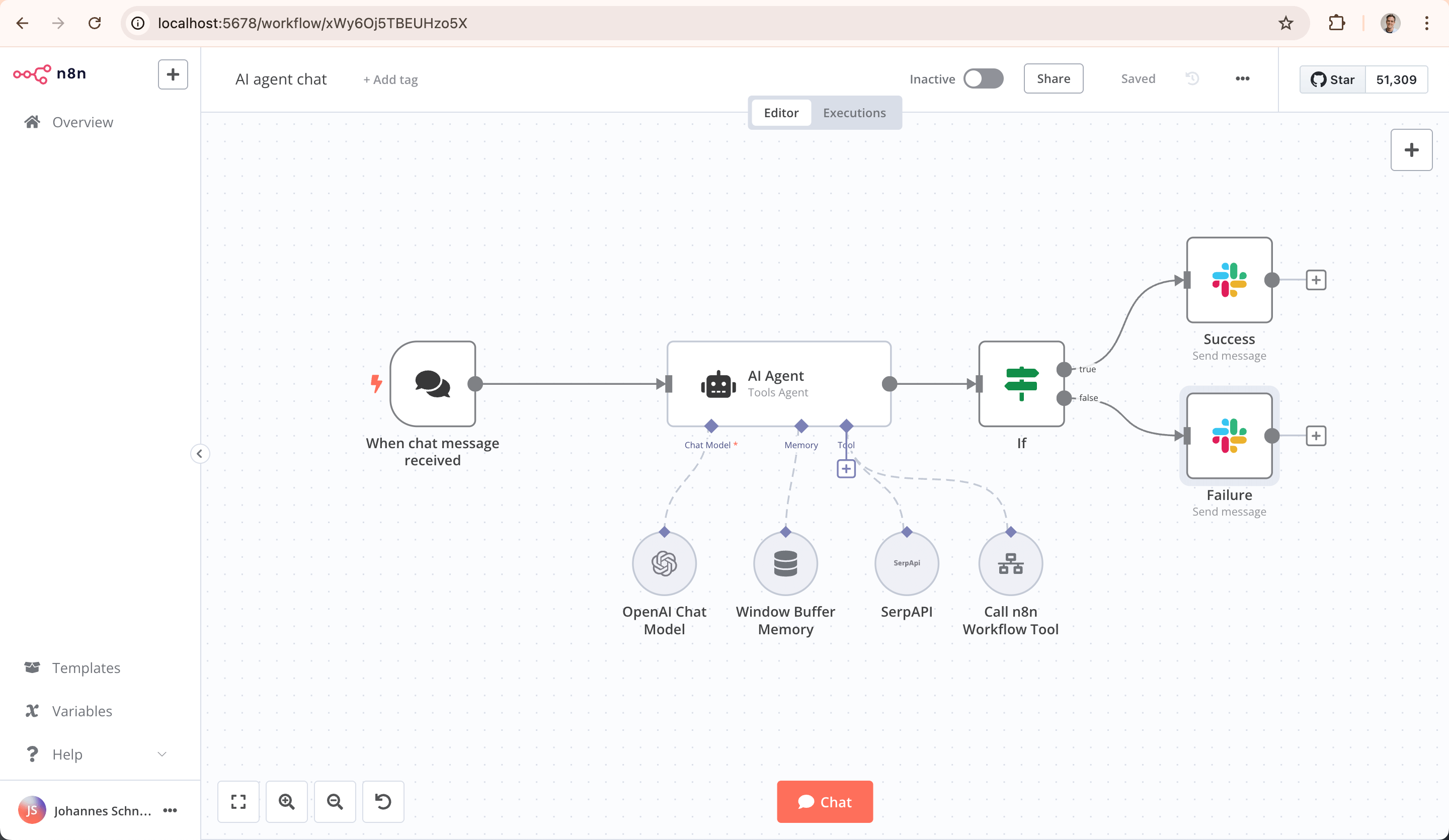
- n8n is a workflow automation platform that gives technical teams the flexibility of code with the speed of no-code. With 400+ integrations, native AI capabilities, and a fair-code license, n8n lets you build powerful aut
-
Key Capabilities
-
- Code When You Need It: Write JavaScript/Python, add npm packages, or use the visual interface
-
- AI-Native Platform: Build AI agent workflows based on LangChain with your own data and models
-
- Full Control: Self-host with our fair-code license or use our cloud offering
-
- Enterprise-Ready: Advanced permissions, SSO, and air-gapped deployments
-
- Active Community: 400+ integrations and 900+ ready-to-use templates
-
Quick Start
- Try n8n instantly with npx (requires Node.js):
4. 아키텍처 구조
Primary language는 TypeScript이고 언어 구성은 다음과 같다.
- TypeScript: 91.4%
- Vue: 7.0%
- JavaScript: 0.7%
- SCSS: 0.4%
- Python: 0.3%
- Handlebars: 0.1%
- MDX: 0.0%
- Dockerfile: 0.0%
- Shell: 0.0%
- HTML: 0.0%
상위 디렉터리 분포:
packages/: 491 filesdocs/: 221 files<root files>/: 33 filesdocker/: 9 filesassets/: 3 files
5. 핵심 모듈
.devcontainer/Dockerfile: ARG NODE_VERSION=24 / FROM node:${NODE_VERSION}-alpine / ARG NODE_VERSION.devcontainer/docker-compose.yml: volumes: / postgres-data: / services:.github/docker-compose.yml: services: / postgres: / image: postgres:16.github/scripts/package.json: { / “name”: “workflow-scripts”, / “scripts”: {.github/workflows/backport.yml: name: ‘Util: Backport pull request changes’ / run-name: Backport pull request $ / on:.github/workflows/build-base-image.yml: name: ‘Build: Base Image’ / on: / push:.github/workflows/build-benchmark-image.yml: name: ‘Build: Benchmark Image’ / on: / workflow_dispatch:.github/workflows/build-windows.yml: name: ‘Build: Windows’ / on: / workflow_dispatch:.github/workflows/ci-check-pr-title.yml: name: ‘CI: Check PR Title’ / on: / pull_request:.github/workflows/ci-check-release-from-fork.yml: name: ‘CI: Block fork PRs to release branches’ / on: / pull_request:.github/workflows/ci-cla-check.yml: name: ‘CI: CLA Check’ / # In-house replacement for the GitHub App “CLA Bot”. / #.github/workflows/ci-codeowners-validation.yml: # .github/workflows/ci-codeowners-validation.yml / name: ‘CI: Validate CODEOWNERS’ / # Only run when CODEOWNERS or packages change.github/workflows/ci-detect-new-packages.yml: name: ‘CI: Detect New Packages on Master’ / on: / pull_request:.github/workflows/ci-instance-ai-evals.yml: name: ‘CI: Instance AI Evals’ / # Auto-runs on PR open/reopen/ready (non-draft, path-filtered). Pushes don’t / # re-trigger (nosynchronize); use workflow_dispatch for manual run.github/workflows/ci-master.yml: name: ‘CI: Master (Build, Test, Lint)’ / on: / push:.github/workflows/ci-mcp-evals.yml: name: ‘CI: MCP Workflow Evals’ / # MCP workflow evals are manual only (workflow_dispatch). The build phase drives / # theclaudeCLI (Anthropic cost + rate limits), so there is n.github/workflows/ci-owners-assign-reviewers.yml: name: ‘CI: Owners Assign Reviewers’ / # Opt-in reviewer auto-assignment. / #.github/workflows/ci-owners-review-recommendations.yml: name: ‘CI: Owners Review Recommendations’ / # Posts (or updates) a PR comment with recommended reviewer teams (based on / # file ownership in .github/OWNERS) and a breakdown of cha.github/workflows/ci-pr-quality.yml: name: ‘CI: PR Quality Checks’ / on: / merge_group:.github/workflows/ci-pull-request-review.yml: name: ‘CI: Pull Request Review’ / on: / pull_request_review:
6. 백엔드 개발자가 배울 점
- README에서 quickstart와 실제 설정 파일이 연결되는지 확인해야 한다.
- CI, Dockerfile, package/build 설정은 재현 가능한 개발환경의 핵심이다.
- 대형 repo일수록 public API와 internal 구현 경계를 문서화해야 유지보수가 가능하다.
7. 내 프로젝트에 훔쳐올 패턴
- 루트 README를 제품 랜딩처럼 구성한다.
- examples/docs/tests를 같은 흐름으로 연결한다.
- release, contributing, security 문서를 운영 표면으로 둔다.
8. 주의할 점 / 안티패턴
- star 수만으로 코드 품질을 단정하면 안 된다.
- README와 실제 코드 구조가 다를 수 있으므로 build/test 실행 검증이 필요하다.
- 대형 repo의 패턴을 작은 프로젝트에 그대로 복사하면 과설계가 될 수 있다.
9. vibe-grid / vibe-hr / jarvis / ehr-harness에 적용할 아이디어
vibe-grid: public API, examples, QA matrix를 repo root에서 쉽게 찾게 만든다.vibe-hr: HR 업무 cycle별 demo와 검증 시나리오를 README/docs에 연결한다.jarvis: raw 자료보다 compiled wiki page를 제품 표면으로 만든다.ehr-harness: 설치, 실행, 안전장치, release log를 명확히 분리한다.
10. Source Links
- GitHub: https://github.com/n8n-io/n8n
- README: https://github.com/n8n-io/n8n#readme
댓글